Add to Toodledo by Toodledotips.jp
Add tasks to Toodledo.com with ease using the Add to Toodledo extension! You can also display a badge to see how many tasks remain.
Available on Firefox for Android™Available on Firefox for Android™
18 Users18 Users
Scan the QR code to open this extension in Firefox for Android

Extension Metadata
Screenshots
About this extension
Add to Toodledo
Features:
- You can easily add tasks from Gmail. You can also add direct download links to Gmail attached files in the task's notes.
(Once you added a task to Toodledo, you can view previews of the Gmail attached files!)
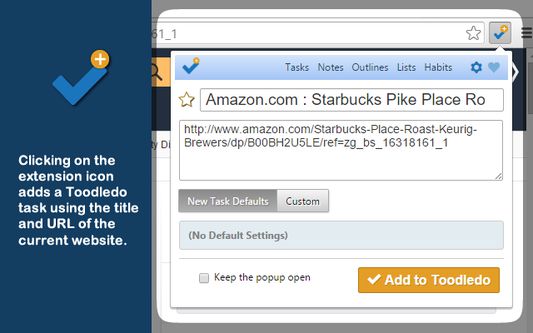
- Clicking on the extension icon adds a Toodledo task using the title and URL of the current website.
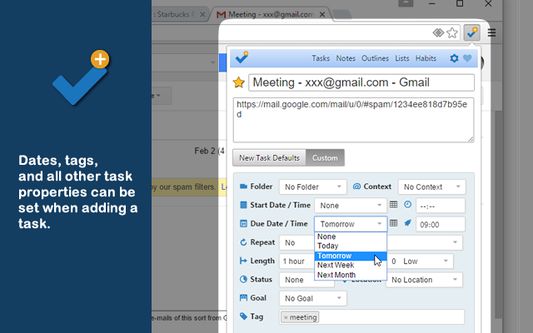
- Dates, tags, and all other task properties can be set when adding a task. Values set for these properties can be saved as the default values for future tasks.
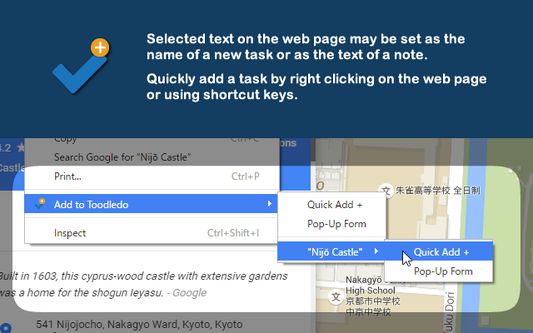
- Selected text on the web page may be set as the name of a new task or as the text of a note.
- Quickly add a task by right clicking on the web page or using shortcut keys.
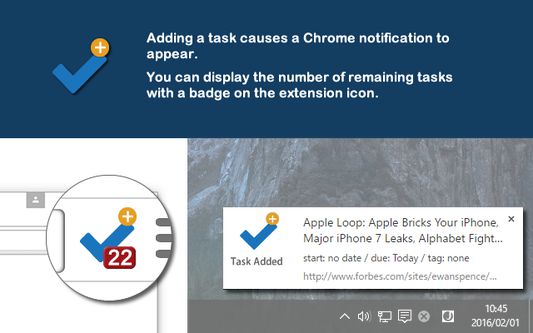
- Adding a task causes a Chrome notification to appear. Clicking on the notification will take you directly to that task.
- You can display the number of remaining tasks with a badge on the extension icon. On the Options menu, you can modify the criteria used to include tasks in this count.
* A Toodledo account is required to use this extension.
www.toodledo.com
Features:
- You can easily add tasks from Gmail. You can also add direct download links to Gmail attached files in the task's notes.
(Once you added a task to Toodledo, you can view previews of the Gmail attached files!)
- Clicking on the extension icon adds a Toodledo task using the title and URL of the current website.
- Dates, tags, and all other task properties can be set when adding a task. Values set for these properties can be saved as the default values for future tasks.
- Selected text on the web page may be set as the name of a new task or as the text of a note.
- Quickly add a task by right clicking on the web page or using shortcut keys.
- Adding a task causes a Chrome notification to appear. Clicking on the notification will take you directly to that task.
- You can display the number of remaining tasks with a badge on the extension icon. On the Options menu, you can modify the criteria used to include tasks in this count.
* A Toodledo account is required to use this extension.
www.toodledo.com
Rated 5 by 1 reviewer
Permissions and data
Required permissions:
- Display notifications to you
- Access browser tabs
- Access your data for all websites
Optional permissions:
- Access your data for all websites
Required data collection, according to the developer:
- Authentication information
- Browsing activity
- Personal communications
- Personally identifying information
- Website content
More information
- Add-on Links
- Version
- 2.0.0.30
- Size
- 405.49 KB
- Last updated
- a day ago (Sep 8, 2026)
- Related Categories
- License
- All Rights Reserved
- Version History
- Add to collection