
My Canned Notes by YourITSup
Your ultimate companion for saving, managing, and quickly accessing notes and canned responses. With a sleek, modern interface and powerful features, "My Canned Notes" streamlines your workflow and keeps your important information just a click away.
24 Users24 Users
Extension Metadata
Screenshots
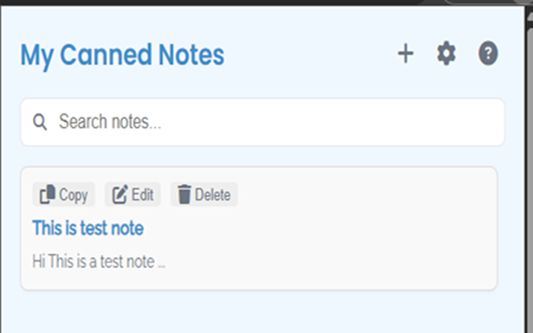


About this extension
The notes extension that can't read your browsing. Because it never asked to.
Most note and snippet extensions request permission to "read and change all your data on the websites you visit." My Canned Notes doesn't — and it can't. It asks for exactly one permission: local storage. No page access. No tabs. No URLs. No network.
Open it, find your snippet, copy it. That's the whole product.
━━━━━━━━━━━━━━━━━━━━━━━━━━━━
WHAT IT DOES
📝 Rich text notes that keep their formatting
Write with bold, colours, links, lists and images. When you copy a note, the formatting comes with it into Gmail, Docs, Slack or anywhere else that accepts rich text — and pastes cleanly as plain text where it doesn't.
📌 Organised the way you actually work
Pin the notes you use daily to the top. Drag and drop to reorder, including within your pinned ones. Tag with colours. Sort A–Z, Z–A, newest or oldest. Turn on Compact view to hide previews when your list gets long.
🔍 Search that keeps up
Instant search across every note. The search box focuses the moment you open the extension, so you can start typing straight away.
⌨ Keyboard-first
Ctrl+F to search, Ctrl+S to save, Esc to step back out of a dialog.
🎨 Nine themes, or build your own
Light, Dark, Nord, Ocean, Pink, Solarized Light, Solarized Dark, Lavender and Mint — plus a custom theme builder if none of them are quite right. Three text sizes, and a Classic layout for anyone who prefers the original look.
💾 Your data, exportable at any time
One click writes every note to a .json file on your computer. Import it back whenever you like. No lock-in, no export request form, no waiting.
━━━━━━━━━━━━━━━━━━━━━━━━━━━━
WHAT IT DELIBERATELY DOESN'T DO
This list is the point of the extension, not an apology for it.
• No account. There is nothing to sign up for.
• No cloud, no sync, no servers. Your notes never leave your machine.
• No page access. It cannot see what you browse, because it never requested the permission that would let it.
• No analytics, no telemetry, no tracking.
• No subscription. It is free, and there is no paid tier to upsell you to.
If you have ever installed a snippet tool and hesitated at the permission warning, this is the one built for that hesitation.
━━━━━━━━━━━━━━━━━━━━━━━━━━━━
WHO IT'S FOR
Support agents with a set of standard replies. Developers keeping code snippets and commands. Recruiters sending the same outreach. Writers with boilerplate. Anyone who types the same paragraph more than twice and would rather not hand a browser extension the keys to every page they visit.
━━━━━━━━━━━━━━━━━━━━━━━━━━━━
IF YOU WANT MORE THAN A CLIPBOARD
We also make Canny Notes, which is a different tool for a different job: it works inside the page you're typing in, adds AI rewriting, sticky notes and highlights, and syncs across devices with an account. That one needs broad page permissions, because inserting text into any text box is impossible without them.
My Canned Notes stays what it is: local, permissionless, and free. Pick whichever suits how you work — they're built for different people.
━━━━━━━━━━━━━━━━━━━━━━━━━━━━
Free. No account. Open it and start writing.
Most note and snippet extensions request permission to "read and change all your data on the websites you visit." My Canned Notes doesn't — and it can't. It asks for exactly one permission: local storage. No page access. No tabs. No URLs. No network.
Open it, find your snippet, copy it. That's the whole product.
━━━━━━━━━━━━━━━━━━━━━━━━━━━━
WHAT IT DOES
📝 Rich text notes that keep their formatting
Write with bold, colours, links, lists and images. When you copy a note, the formatting comes with it into Gmail, Docs, Slack or anywhere else that accepts rich text — and pastes cleanly as plain text where it doesn't.
📌 Organised the way you actually work
Pin the notes you use daily to the top. Drag and drop to reorder, including within your pinned ones. Tag with colours. Sort A–Z, Z–A, newest or oldest. Turn on Compact view to hide previews when your list gets long.
🔍 Search that keeps up
Instant search across every note. The search box focuses the moment you open the extension, so you can start typing straight away.
⌨ Keyboard-first
Ctrl+F to search, Ctrl+S to save, Esc to step back out of a dialog.
🎨 Nine themes, or build your own
Light, Dark, Nord, Ocean, Pink, Solarized Light, Solarized Dark, Lavender and Mint — plus a custom theme builder if none of them are quite right. Three text sizes, and a Classic layout for anyone who prefers the original look.
💾 Your data, exportable at any time
One click writes every note to a .json file on your computer. Import it back whenever you like. No lock-in, no export request form, no waiting.
━━━━━━━━━━━━━━━━━━━━━━━━━━━━
WHAT IT DELIBERATELY DOESN'T DO
This list is the point of the extension, not an apology for it.
• No account. There is nothing to sign up for.
• No cloud, no sync, no servers. Your notes never leave your machine.
• No page access. It cannot see what you browse, because it never requested the permission that would let it.
• No analytics, no telemetry, no tracking.
• No subscription. It is free, and there is no paid tier to upsell you to.
If you have ever installed a snippet tool and hesitated at the permission warning, this is the one built for that hesitation.
━━━━━━━━━━━━━━━━━━━━━━━━━━━━
WHO IT'S FOR
Support agents with a set of standard replies. Developers keeping code snippets and commands. Recruiters sending the same outreach. Writers with boilerplate. Anyone who types the same paragraph more than twice and would rather not hand a browser extension the keys to every page they visit.
━━━━━━━━━━━━━━━━━━━━━━━━━━━━
IF YOU WANT MORE THAN A CLIPBOARD
We also make Canny Notes, which is a different tool for a different job: it works inside the page you're typing in, adds AI rewriting, sticky notes and highlights, and syncs across devices with an account. That one needs broad page permissions, because inserting text into any text box is impossible without them.
My Canned Notes stays what it is: local, permissionless, and free. Pick whichever suits how you work — they're built for different people.
━━━━━━━━━━━━━━━━━━━━━━━━━━━━
Free. No account. Open it and start writing.
Rated 5 by 2 reviewers
More information
- Add-on Links
- Version
- 2.10.0
- Size
- 753.79 KB
- Last updated
- a day ago (Sep 9, 2026)
- Related Categories
- License
- Mozilla Public License 2.0
- Version History
- Add to collection
The developer of this extension asks that you help support its continued development by making a small contribution.